가입은 5분이면 끝납니다. 대부분 이미 가진 구글 계정이나 애플 계정으로 버튼 한 번에 가입할 수 있습니다.
2026년 9월 기준 화면입니다. 버튼 위치나 문구는 조금씩 바뀔 수 있습니다.
가입하면 좋은 점
가입하지 않고 쓸 수 있는 서비스도 있습니다. 그래도 가입하면 이런 점이 좋습니다.
지난 대화가 저장되어 나중에 다시 볼 수 있습니다
휴대폰과 컴퓨터에서 같은 대화를 이어 갈 수 있습니다
사진 올리기 같은 더 많은 기능을 무료로 쓸 수 있습니다
컴퓨터에서 가입하기
컴퓨터에서는 따로 설치할 필요 없이 인터넷 창(크롬, 엣지, 사파리 등)에서 바로 씁니다.
1
공식 주소로 들어갑니다
주소창에 직접 입력하세요.
ChatGPT: chatgpt.com
Gemini: gemini.google.com
Claude: claude.ai
2
가입 버튼을 누릅니다
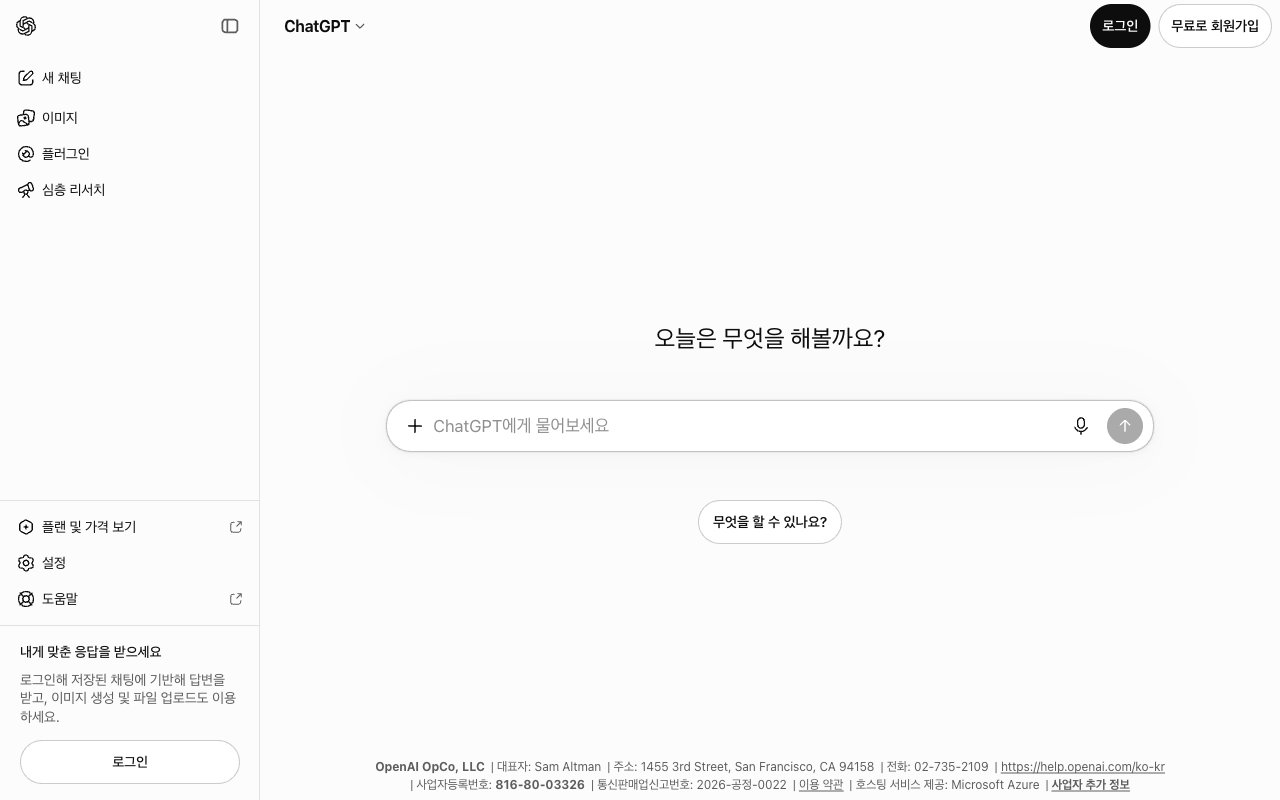
화면 오른쪽 위의 무료로 회원가입 또는 로그인 버튼을 누릅니다.
ChatGPT는 오른쪽 위에 '로그인'과 '무료로 회원가입' 버튼이 있습니다.
3
가입 방법을 고릅니다
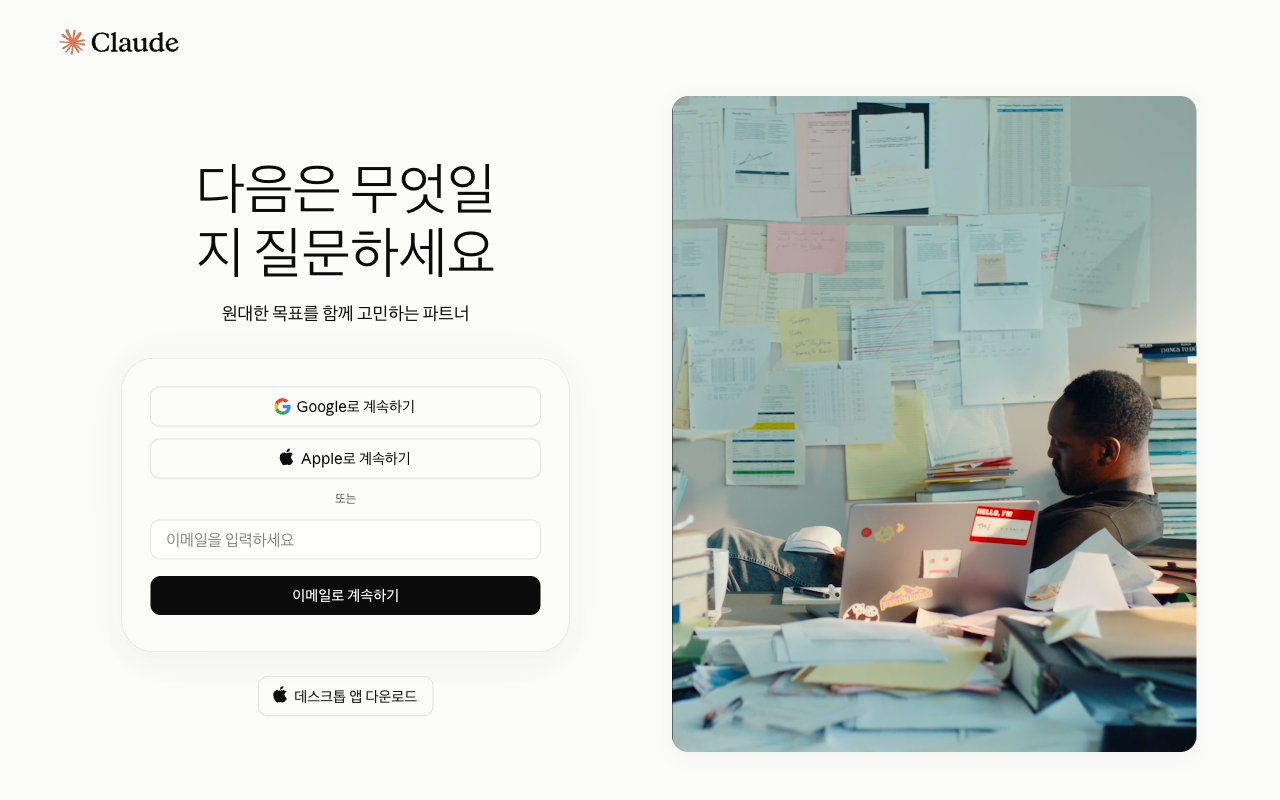
Google로 계속하기를 누르면 쓰고 있는 지메일 계정으로 바로 가입됩니다. 비밀번호를 새로 만들 필요가 없어 가장 쉽습니다.
Claude 가입 화면. 구글, 애플, 이메일 중 하나를 고릅니다.
4
안내에 따라 마무리합니다
이름이나 생년월일을 물어보면 입력합니다. 휴대폰 번호 인증을 요구하는 서비스도 있습니다. 끝나면 바로 입력창이 나옵니다.
결제 정보는 입력하지 않아도 됩니다. 가입 중에 유료 요금제 안내가 나오면 무료로 계속 같은 버튼을 찾거나 창을 닫으면 됩니다.
휴대폰에 앱 설치하기
휴대폰에서는 앱을 설치하면 더 편합니다. 음성으로 대화하거나 사진을 찍어 바로 물어볼 수 있습니다.
1
앱 스토어를 엽니다
아이폰은 App Store, 안드로이드는 Play 스토어를 엽니다.
2
이름으로 검색합니다
ChatGPT, Gemini, Claude 중 원하는 이름을 검색합니다.
3
만든 회사를 확인합니다
설치 버튼을 누르기 전에 앱 이름 아래 개발자(만든 회사) 이름을 꼭 확인하세요.
앱
개발자 이름
ChatGPT
OpenAI
Gemini
Google LLC
Claude
Anthropic
Copilot
Microsoft Corporation
4
설치하고 같은 계정으로 로그인합니다
컴퓨터에서 가입한 계정으로 로그인하면 대화 기록이 이어집니다.
안드로이드 휴대폰에는 Gemini가 이미 들어 있는 경우가 많습니다. 전원 버튼을 길게 누르거나 “헤이 구글”이라고 말하면 나올 수 있습니다.
가짜 앱과 가짜 사이트 피하기
AI가 인기를 끌면서 이름만 비슷한 가짜 앱이 많아졌습니다. 이런 앱은 돈을 요구하거나 개인정보를 빼 가기도 합니다.
이런 경우는 의심하세요.
개발자 이름이 위 표와 다릅니다 (예: “AI Chat Assistant”, “GPT Chat Bot” 같은 이름)
설치하자마자 결제를 요구합니다
문자나 광고 링크를 눌러서 들어간 사이트입니다
주소가 공식 주소와 한두 글자 다릅니다
공식 서비스는 모두 무료로 가입할 수 있습니다. 가입이나 설치 단계에서 돈을 내라고 하면 가짜일 가능성이 높습니다.
직접 해 보기
마음에 드는 서비스 하나에 가입하고, 휴대폰에도 같은 앱을 설치해 보세요. 두 곳에서 같은 계정으로 로그인되어 있으면 준비는 끝입니다.
다음으로
첫 대화 나눠 보기
드디어 AI에게 말을 걸어 봅니다.
{"docsConfig":{"theme":"mint","$schema":"https://mintlify.com/docs.json","name":"AI 무료 교과서","description":"AI 챗봇, 어디서부터 시작할지 모르겠는 분들을 위한 안내서","colors":{"primary":"#2563EB","light":"#60A5FA","dark":"#1D4ED8"},"favicon":"https://mintcdn.com/zerok-b6ccbc45/u8XmZ7CT4_qWW39y/favicon.svg?fit=max\u0026auto=format\u0026n=u8XmZ7CT4_qWW39y\u0026q=85\u0026s=4a4d99ea2b6df975da856093454743c1","navbar":{"primary":{"type":"button","label":"처음부터 배우기","href":"/basics/what-is-llm"}},"footer":{"links":[{"header":"안내","items":[{"label":"함께 만들기","href":"/appendix/contribute"},{"label":"자주 묻는 질문","href":"/appendix/faq"}]}]},"styling":{"latex":false},"navigation":{"languages":[{"language":"ko","default":true,"href":""}]}},"deployment":{"deploymentMetadataValue":{"subdomain":"zerok-b6ccbc45","hasAudioNarration":false,"actualSubdomain":"zerok-b6ccbc45","customDomains":[],"gitSource":{"type":"github","owner":"shyoon-devops","repo":"ai-free-textbook","deployBranch":"main","contentDirectory":"","isPrivate":false,"mountPath":"","label":""},"entitlements":{"AI_CHAT":{"status":"DISABLED"},"WEB_MCP":{"status":"DISABLED"},"NARRATION":{"status":"DISABLED"}},"buildId":"6ac3220c26af85d685fd62d4","clientVersion":"0.0.4177","searchFilterCounts":[{"language":"ko","tag":"배우기","count":27},{"language":"ko","tag":"자료실","count":10},{"language":"ko","tag":"2단계 · 생활 속 활용","count":5},{"language":"ko","tag":"0단계 · AI와 첫 만남","count":4},{"language":"ko","tag":"5단계 · 한 걸음 더","count":4},{"language":"ko","tag":"4단계 · 꼭 알아야 할 주의사항","count":4},{"language":"ko","tag":"3단계 · 더 잘 쓰기","count":4},{"language":"ko","tag":"1단계 · 대화의 기초","count":4},{"language":"ko","tag":"시작하기","count":2}]},"assistantConfig":{"enableAskAiButton":false,"enableStarterQuestions":false,"enableContextualStarterQuestions":false,"enableAskAiSearchBar":true},"basePath":"","hasChatPermissions":false,"hasWebMcpPermissions":false,"toggles":[{"name":"kill-isr","enabled":true,"variant":{"name":"disabled","enabled":false,"feature_enabled":true},"impressionData":false},{"name":"custom-rbac-roles","enabled":true,"variant":{"name":"disabled","enabled":false,"feature_enabled":true},"impressionData":false},{"name":"agent-mintlify-slack","enabled":true,"variant":{"name":"disabled","enabled":false,"feature_enabled":true},"impressionData":false},{"name":"agent-integrations-settings","enabled":true,"variant":{"name":"disabled","enabled":false,"feature_enabled":true},"impressionData":false},{"name":"rbac-expansion","enabled":true,"variant":{"name":"disabled","enabled":false,"feature_enabled":true},"impressionData":false},{"name":"automations-pr-grouping","enabled":true,"variant":{"name":"disabled","enabled":false,"feature_enabled":true},"impressionData":false},{"name":"custom-prefix","enabled":true,"variant":{"name":"disabled","enabled":false,"feature_enabled":true},"impressionData":false},{"name":"analytics-v7","enabled":true,"variant":{"name":"disabled","enabled":false,"feature_enabled":true},"impressionData":false},{"name":"user-flows-analytics","enabled":true,"variant":{"name":"disabled","enabled":false,"feature_enabled":true},"impressionData":false},{"name":"no-publish-flow","enabled":true,"variant":{"name":"disabled","enabled":false,"feature_enabled":true},"impressionData":false},{"name":"workos-onboarding","enabled":true,"variant":{"name":"disabled","enabled":false,"feature_enabled":true},"impressionData":false},{"name":"snapshot-serving-live","enabled":true,"variant":{"name":"disabled","enabled":false,"feature_enabled":true},"impressionData":false},{"name":"stripTemperatureMiddleware","enabled":true,"variant":{"name":"disabled","enabled":false,"feature_enabled":true},"impressionData":false},{"name":"support-platform-pylon-zendesk","enabled":true,"variant":{"name":"disabled","enabled":false,"feature_enabled":true},"impressionData":false},{"name":"snapshot-serving","enabled":true,"variant":{"name":"disabled","enabled":false,"feature_enabled":true},"impressionData":false},{"name":"instant-rollback","enabled":true,"variant":{"name":"disabled","enabled":false,"feature_enabled":true},"impressionData":false},{"name":"granular-notifications-server","enabled":true,"variant":{"name":"disabled","enabled":false,"feature_enabled":true},"impressionData":false},{"name":"granular-notifications","enabled":true,"variant":{"name":"disabled","enabled":false,"feature_enabled":true},"impressionData":false},{"name":"automations-fable","enabled":true,"variant":{"name":"disabled","enabled":false,"feature_enabled":true},"impressionData":false},{"name":"fixed-ai-action-pricing","enabled":true,"variant":{"name":"disabled","enabled":false,"feature_enabled":true},"impressionData":false},{"name":"site-roles","enabled":true,"variant":{"name":"disabled","enabled":false,"feature_enabled":true},"impressionData":false},{"name":"automation-resolve-merge-conflict","enabled":true,"variant":{"name":"disabled","enabled":false,"feature_enabled":true},"impressionData":false},{"name":"scoped-publishing","enabled":true,"variant":{"name":"disabled","enabled":false,"feature_enabled":true},"impressionData":false},{"name":"mintql","enabled":true,"variant":{"name":"disabled","enabled":false,"feature_enabled":true},"impressionData":false},{"name":"page-level-analytics","enabled":true,"variant":{"name":"disabled","enabled":false,"feature_enabled":true},"impressionData":false},{"name":"editor-version-history-v2","enabled":true,"variant":{"name":"disabled","enabled":false,"feature_enabled":true},"impressionData":false},{"name":"billing-page-v2","enabled":true,"variant":{"name":"disabled","enabled":false,"feature_enabled":true},"impressionData":false},{"name":"full-page-search","enabled":true,"variant":{"name":"disabled","enabled":false,"feature_enabled":true},"impressionData":false},{"name":"workspace-projects","enabled":true,"variant":{"name":"disabled","enabled":false,"feature_enabled":true},"impressionData":false},{"name":"assistant-v5","enabled":true,"variant":{"name":"disabled","enabled":false,"feature_enabled":true},"impressionData":false},{"name":"fork-pr-previews","enabled":true,"variant":{"name":"disabled","enabled":false,"feature_enabled":true},"impressionData":false},{"name":"revalidation-jwt","enabled":true,"variant":{"name":"disabled","enabled":false,"feature_enabled":true},"impressionData":false},{"name":"workos-sso-scim","enabled":true,"variant":{"name":"disabled","enabled":false,"feature_enabled":true},"impressionData":false},{"name":"hobby-abuse-scan","enabled":true,"variant":{"name":"disabled","enabled":false,"feature_enabled":true},"impressionData":false},{"name":"dashboard-inbox","enabled":true,"variant":{"name":"disabled","enabled":false,"feature_enabled":true},"impressionData":false},{"name":"workos-signup","enabled":true,"variant":{"name":"disabled","enabled":false,"feature_enabled":true},"impressionData":false},{"name":"turbopuffer-dual-write","enabled":true,"variant":{"name":"disabled","enabled":false,"feature_enabled":true},"impressionData":false},{"name":"workos-enabled","enabled":true,"variant":{"name":"disabled","enabled":false,"feature_enabled":true},"impressionData":false},{"name":"approve-review-flow","enabled":true,"variant":{"name":"disabled","enabled":false,"feature_enabled":true},"impressionData":false},{"name":"editor-metadata","enabled":true,"variant":{"name":"disabled","enabled":false,"feature_enabled":true},"impressionData":false},{"name":"sso-setup-deadline-banner","enabled":true,"variant":{"name":"disabled","enabled":false,"feature_enabled":true},"impressionData":false},{"name":"turbopuffer-serve","enabled":true,"variant":{"name":"disabled","enabled":false,"feature_enabled":true},"impressionData":false},{"name":"live-agents","enabled":true,"variant":{"name":"disabled","enabled":false,"feature_enabled":true},"impressionData":false},{"name":"starter-pricing","enabled":true,"variant":{"name":"control","enabled":true,"payload":{"type":"string","value":"control"},"feature_enabled":true},"impressionData":false},{"name":"llms-txt-v2","enabled":true,"variant":{"name":"disabled","enabled":false,"feature_enabled":true},"impressionData":false},{"name":"wildcard-email-auth","enabled":true,"variant":{"name":"disabled","enabled":false,"feature_enabled":true},"impressionData":false}],"googleFontsInlined":false},"customCss":[],"page":{"pagePath":"basics/signup","slug":"/basics/signup","pageMetadata":{"title":"가입하고 설치하기","description":"휴대폰과 컴퓨터에서 AI를 쓸 준비하기","icon":"user-plus","href":"/basics/signup"},"description":{"compiledSource":"\"use strict\";\nconst {jsx: _jsx} = arguments[0];\nconst {useMDXComponents: _provideComponents} = arguments[0];\nfunction _createMdxContent(props) {\n const _components = {\n p: \"p\",\n ..._provideComponents(),\n ...props.components\n };\n return _jsx(_components.p, {\n children: \"휴대폰과 컴퓨터에서 AI를 쓸 준비하기\"\n });\n}\nfunction MDXContent(props = {}) {\n const {wrapper: MDXLayout} = {\n ..._provideComponents(),\n ...props.components\n };\n return MDXLayout ? _jsx(MDXLayout, {\n ...props,\n children: _jsx(_createMdxContent, {\n ...props\n })\n }) : _createMdxContent(props);\n}\nreturn {\n default: MDXContent\n};\n","frontmatter":{},"scope":{}},"pageType":"default","mdx":{"mdxSource":{"compiledSource":"\"use strict\";const{Fragment:_Fragment,jsx:_jsx,jsxs:_jsxs}=arguments[0];const{useMDXComponents:_provideComponents}=arguments[0];function _createMdxContent(props){const _components={code:`code`,li:`li`,p:`p`,strong:`strong`,tbody:`tbody`,td:`td`,th:`th`,thead:`thead`,tr:`tr`,ul:`ul`,..._provideComponents(),...props.components},{Card,Frame,Heading,Info,Note,OptimizedImage,Step,Steps,Table,Tip,Warning}=_components;if(!Card)_missingMdxReference(`Card`,true);if(!Frame)_missingMdxReference(`Frame`,true);if(!Heading)_missingMdxReference(`Heading`,true);if(!Info)_missingMdxReference(`Info`,true);if(!Note)_missingMdxReference(`Note`,true);if(!OptimizedImage)_missingMdxReference(`OptimizedImage`,true);if(!Step)_missingMdxReference(`Step`,true);if(!Steps)_missingMdxReference(`Steps`,true);if(!Table)_missingMdxReference(`Table`,true);if(!Tip)_missingMdxReference(`Tip`,true);if(!Warning)_missingMdxReference(`Warning`,true);return _jsxs(_Fragment,{children:[_jsxs(_components.p,{children:[`가입은 5분이면 끝납니다. 대부분 `,_jsx(_components.strong,{children:`이미 가진 구글 계정이나 애플 계정`}),`으로 버튼 한 번에 가입할 수 있습니다.`]}),`\n`,_jsx(Note,{children:_jsx(_components.p,{children:`2026년 9월 기준 화면입니다. 버튼 위치나 문구는 조금씩 바뀔 수 있습니다.`})}),`\n`,_jsx(Heading,{level:`2`,id:`가입하면-좋은-점`,children:`가입하면 좋은 점`}),`\n`,_jsx(_components.p,{children:`가입하지 않고 쓸 수 있는 서비스도 있습니다. 그래도 가입하면 이런 점이 좋습니다.`}),`\n`,_jsxs(_components.ul,{children:[`\n`,_jsxs(_components.li,{children:[`지난 대화가 `,_jsx(_components.strong,{children:`저장`}),`되어 나중에 다시 볼 수 있습니다`]}),`\n`,_jsxs(_components.li,{children:[`휴대폰과 컴퓨터에서 `,_jsx(_components.strong,{children:`같은 대화`}),`를 이어 갈 수 있습니다`]}),`\n`,_jsxs(_components.li,{children:[`사진 올리기 같은 `,_jsx(_components.strong,{children:`더 많은 기능`}),`을 무료로 쓸 수 있습니다`]}),`\n`]}),`\n`,_jsx(Heading,{level:`2`,id:`컴퓨터에서-가입하기`,children:`컴퓨터에서 가입하기`}),`\n`,_jsx(_components.p,{children:`컴퓨터에서는 따로 설치할 필요 없이 인터넷 창(크롬, 엣지, 사파리 등)에서 바로 씁니다.`}),`\n`,_jsxs(Steps,{children:[_jsxs(Step,{title:`공식 주소로 들어갑니다`,children:[_jsx(_components.p,{children:`주소창에 직접 입력하세요.`}),_jsxs(_components.ul,{children:[`\n`,_jsxs(_components.li,{children:[`ChatGPT: `,_jsx(_components.code,{children:`chatgpt.com`})]}),`\n`,_jsxs(_components.li,{children:[`Gemini: `,_jsx(_components.code,{children:`gemini.google.com`})]}),`\n`,_jsxs(_components.li,{children:[`Claude: `,_jsx(_components.code,{children:`claude.ai`})]}),`\n`]})]}),_jsxs(Step,{title:`가입 버튼을 누릅니다`,children:[_jsxs(_components.p,{children:[`화면 오른쪽 위의 `,_jsx(_components.strong,{children:`무료로 회원가입`}),` 또는 `,_jsx(_components.strong,{children:`로그인`}),` 버튼을 누릅니다.`]}),_jsx(Frame,{caption:`ChatGPT는 오른쪽 위에 '로그인'과 '무료로 회원가입' 버튼이 있습니다.`,children:_jsx(OptimizedImage,{src:`https://mintcdn.com/zerok-b6ccbc45/S6hmT29jOtT2SS_i/images/basics/chatgpt-home.png?fit=max\u0026auto=format\u0026n=S6hmT29jOtT2SS_i\u0026q=85\u0026s=25a14e3e3cc713cca1fb0c0f8cea6125`,alt:`ChatGPT 첫 화면 오른쪽 위에 검은색 로그인 버튼과 흰색 무료로 회원가입 버튼이 있습니다.`,\"data-og-width\":`1280`,width:`1280`,\"data-og-height\":`800`,height:`800`,\"data-path\":`images/basics/chatgpt-home.png`,\"data-optimize\":`true`,\"data-opv\":`3`,srcset:`https://mintcdn.com/zerok-b6ccbc45/S6hmT29jOtT2SS_i/images/basics/chatgpt-home.png?w=280\u0026fit=max\u0026auto=format\u0026n=S6hmT29jOtT2SS_i\u0026q=85\u0026s=0072166af86fe6d2243ede66f14dfe6c 280w, https://mintcdn.com/zerok-b6ccbc45/S6hmT29jOtT2SS_i/images/basics/chatgpt-home.png?w=560\u0026fit=max\u0026auto=format\u0026n=S6hmT29jOtT2SS_i\u0026q=85\u0026s=659d81fdc16e961b515d5323dc71ea25 560w, https://mintcdn.com/zerok-b6ccbc45/S6hmT29jOtT2SS_i/images/basics/chatgpt-home.png?w=840\u0026fit=max\u0026auto=format\u0026n=S6hmT29jOtT2SS_i\u0026q=85\u0026s=ee3b79cb0100a7ccdf93a3f884af7975 840w, https://mintcdn.com/zerok-b6ccbc45/S6hmT29jOtT2SS_i/images/basics/chatgpt-home.png?w=1100\u0026fit=max\u0026auto=format\u0026n=S6hmT29jOtT2SS_i\u0026q=85\u0026s=1984d7c5381dfa10ba97bb2031661ab5 1100w, https://mintcdn.com/zerok-b6ccbc45/S6hmT29jOtT2SS_i/images/basics/chatgpt-home.png?w=1650\u0026fit=max\u0026auto=format\u0026n=S6hmT29jOtT2SS_i\u0026q=85\u0026s=42ca094a4fdb52f3ed38d151db7a637c 1650w, https://mintcdn.com/zerok-b6ccbc45/S6hmT29jOtT2SS_i/images/basics/chatgpt-home.png?w=2500\u0026fit=max\u0026auto=format\u0026n=S6hmT29jOtT2SS_i\u0026q=85\u0026s=ee75c582f8099ebd46e1d025fd8c03a8 2500w`})})]}),_jsxs(Step,{title:`가입 방법을 고릅니다`,children:[_jsxs(_components.p,{children:[_jsx(_components.strong,{children:`Google로 계속하기`}),`를 누르면 쓰고 있는 지메일 계정으로 바로 가입됩니다. 비밀번호를 새로 만들 필요가 없어 가장 쉽습니다.`]}),_jsx(Frame,{caption:`Claude 가입 화면. 구글, 애플, 이메일 중 하나를 고릅니다.`,children:_jsx(OptimizedImage,{src:`https://mintcdn.com/zerok-b6ccbc45/S6hmT29jOtT2SS_i/images/basics/claude-login.png?fit=max\u0026auto=format\u0026n=S6hmT29jOtT2SS_i\u0026q=85\u0026s=43283c1ffbc92b628d0a5460bb31c087`,alt:`Claude 로그인 화면. 'Google로 계속하기', 'Apple로 계속하기' 버튼과 이메일 입력칸, '이메일로 계속하기' 버튼이 있습니다.`,\"data-og-width\":`1280`,width:`1280`,\"data-og-height\":`800`,height:`800`,\"data-path\":`images/basics/claude-login.png`,\"data-optimize\":`true`,\"data-opv\":`3`,srcset:`https://mintcdn.com/zerok-b6ccbc45/S6hmT29jOtT2SS_i/images/basics/claude-login.png?w=280\u0026fit=max\u0026auto=format\u0026n=S6hmT29jOtT2SS_i\u0026q=85\u0026s=2143e3daad8d79c56a158c7cff93ff17 280w, https://mintcdn.com/zerok-b6ccbc45/S6hmT29jOtT2SS_i/images/basics/claude-login.png?w=560\u0026fit=max\u0026auto=format\u0026n=S6hmT29jOtT2SS_i\u0026q=85\u0026s=609c330535afb6809e15e2dba3c2dd8e 560w, https://mintcdn.com/zerok-b6ccbc45/S6hmT29jOtT2SS_i/images/basics/claude-login.png?w=840\u0026fit=max\u0026auto=format\u0026n=S6hmT29jOtT2SS_i\u0026q=85\u0026s=6889814a7a1f621135a2c19c8a9c83fb 840w, https://mintcdn.com/zerok-b6ccbc45/S6hmT29jOtT2SS_i/images/basics/claude-login.png?w=1100\u0026fit=max\u0026auto=format\u0026n=S6hmT29jOtT2SS_i\u0026q=85\u0026s=62dc6193e5b5d2220781f4e226f294c8 1100w, https://mintcdn.com/zerok-b6ccbc45/S6hmT29jOtT2SS_i/images/basics/claude-login.png?w=1650\u0026fit=max\u0026auto=format\u0026n=S6hmT29jOtT2SS_i\u0026q=85\u0026s=4ddb65811720c6e689fc776f772f628a 1650w, https://mintcdn.com/zerok-b6ccbc45/S6hmT29jOtT2SS_i/images/basics/claude-login.png?w=2500\u0026fit=max\u0026auto=format\u0026n=S6hmT29jOtT2SS_i\u0026q=85\u0026s=89a945eed749f69bb96ef6402b9bac75 2500w`})})]}),_jsx(Step,{title:`안내에 따라 마무리합니다`,children:_jsx(_components.p,{children:`이름이나 생년월일을 물어보면 입력합니다. 휴대폰 번호 인증을 요구하는 서비스도 있습니다. 끝나면 바로 입력창이 나옵니다.`})})]}),`\n`,_jsx(Tip,{children:_jsxs(_components.p,{children:[_jsx(_components.strong,{children:`결제 정보는 입력하지 않아도 됩니다.`}),` 가입 중에 유료 요금제 안내가 나오면 `,_jsx(_components.strong,{children:`무료로 계속`}),` 같은 버튼을 찾거나 창을 닫으면 됩니다.`]})}),`\n`,_jsx(Heading,{level:`2`,id:`휴대폰에-앱-설치하기`,children:`휴대폰에 앱 설치하기`}),`\n`,_jsx(_components.p,{children:`휴대폰에서는 앱을 설치하면 더 편합니다. 음성으로 대화하거나 사진을 찍어 바로 물어볼 수 있습니다.`}),`\n`,_jsxs(Steps,{children:[_jsx(Step,{title:`앱 스토어를 엽니다`,children:_jsxs(_components.p,{children:[`아이폰은 `,_jsx(_components.strong,{children:`App Store`}),`, 안드로이드는 `,_jsx(_components.strong,{children:`Play 스토어`}),`를 엽니다.`]})}),_jsx(Step,{title:`이름으로 검색합니다`,children:_jsxs(_components.p,{children:[_jsx(_components.code,{children:`ChatGPT`}),`, `,_jsx(_components.code,{children:`Gemini`}),`, `,_jsx(_components.code,{children:`Claude`}),` 중 원하는 이름을 검색합니다.`]})}),_jsxs(Step,{title:`만든 회사를 확인합니다`,children:[_jsxs(_components.p,{children:[`설치 버튼을 누르기 전에 앱 이름 아래 `,_jsx(_components.strong,{children:`개발자(만든 회사)`}),` 이름을 꼭 확인하세요.`]}),_jsxs(Table,{children:[_jsx(_components.thead,{children:_jsxs(_components.tr,{children:[_jsx(_components.th,{children:`앱`}),_jsx(_components.th,{children:`개발자 이름`})]})}),_jsxs(_components.tbody,{children:[_jsxs(_components.tr,{children:[_jsx(_components.td,{children:`ChatGPT`}),_jsx(_components.td,{children:`OpenAI`})]}),_jsxs(_components.tr,{children:[_jsx(_components.td,{children:`Gemini`}),_jsx(_components.td,{children:`Google LLC`})]}),_jsxs(_components.tr,{children:[_jsx(_components.td,{children:`Claude`}),_jsx(_components.td,{children:`Anthropic`})]}),_jsxs(_components.tr,{children:[_jsx(_components.td,{children:`Copilot`}),_jsx(_components.td,{children:`Microsoft Corporation`})]})]})]})]}),_jsx(Step,{title:`설치하고 같은 계정으로 로그인합니다`,children:_jsx(_components.p,{children:`컴퓨터에서 가입한 계정으로 로그인하면 대화 기록이 이어집니다.`})})]}),`\n`,_jsx(Info,{children:_jsx(_components.p,{children:`안드로이드 휴대폰에는 Gemini가 이미 들어 있는 경우가 많습니다. 전원 버튼을 길게 누르거나 “헤이 구글”이라고 말하면 나올 수 있습니다.`})}),`\n`,_jsx(Heading,{level:`2`,id:`가짜-앱과-가짜-사이트-피하기`,children:`가짜 앱과 가짜 사이트 피하기`}),`\n`,_jsx(_components.p,{children:`AI가 인기를 끌면서 이름만 비슷한 가짜 앱이 많아졌습니다. 이런 앱은 돈을 요구하거나 개인정보를 빼 가기도 합니다.`}),`\n`,_jsxs(Warning,{children:[_jsx(_components.p,{children:`이런 경우는 의심하세요.`}),_jsxs(_components.ul,{children:[`\n`,_jsx(_components.li,{children:`개발자 이름이 위 표와 다릅니다 (예: “AI Chat Assistant”, “GPT Chat Bot” 같은 이름)`}),`\n`,_jsxs(_components.li,{children:[`설치하자마자 `,_jsx(_components.strong,{children:`결제`}),`를 요구합니다`]}),`\n`,_jsx(_components.li,{children:`문자나 광고 링크를 눌러서 들어간 사이트입니다`}),`\n`,_jsx(_components.li,{children:`주소가 공식 주소와 한두 글자 다릅니다`}),`\n`]})]}),`\n`,_jsxs(_components.p,{children:[`공식 서비스는 모두 `,_jsx(_components.strong,{children:`무료로 가입`}),`할 수 있습니다. 가입이나 설치 단계에서 돈을 내라고 하면 가짜일 가능성이 높습니다.`]}),`\n`,_jsx(Heading,{level:`2`,id:`직접-해-보기`,children:`직접 해 보기`}),`\n`,_jsx(_components.p,{children:`마음에 드는 서비스 하나에 가입하고, 휴대폰에도 같은 앱을 설치해 보세요. 두 곳에서 같은 계정으로 로그인되어 있으면 준비는 끝입니다.`}),`\n`,_jsx(Heading,{level:`2`,id:`다음으로`,children:`다음으로`}),`\n`,_jsx(Card,{title:`첫 대화 나눠 보기`,icon:`arrow-right`,href:`/basics/first-chat`,children:_jsx(_components.p,{children:`드디어 AI에게 말을 걸어 봅니다.`})})]})}function MDXContent(props={}){const{wrapper:MDXLayout}={..._provideComponents(),...props.components};return MDXLayout?_jsx(MDXLayout,{...props,children:_jsx(_createMdxContent,{...props})}):_createMdxContent(props)}return{default:MDXContent};function _missingMdxReference(id,component){throw new Error(`Expected `+(component?`component`:`object`)+\" `\"+id+\"` to be defined: you likely forgot to import, pass, or provide it.\")}","frontmatter":{},"scope":{"config":{},"pageMetadata":{"title":"가입하고 설치하기","description":"휴대폰과 컴퓨터에서 AI를 쓸 준비하기","icon":"user-plus","href":"/basics/signup"}}},"mdxSourceWithNoJs":null},"mdxExtracts":{"tableOfContents":[{"title":"가입하면 좋은 점","slug":"가입하면-좋은-점","depth":2,"children":[]},{"title":"컴퓨터에서 가입하기","slug":"컴퓨터에서-가입하기","depth":2,"children":[]},{"title":"휴대폰에 앱 설치하기","slug":"휴대폰에-앱-설치하기","depth":2,"children":[]},{"title":"가짜 앱과 가짜 사이트 피하기","slug":"가짜-앱과-가짜-사이트-피하기","depth":2,"children":[]},{"title":"직접 해 보기","slug":"직접-해-보기","depth":2,"children":[]},{"title":"다음으로","slug":"다음으로","depth":2,"children":[]}],"codeExamples":{}},"jsLinks":[],"subdomain":"zerok-b6ccbc45","siteName":"AI 무료 교과서","title":"가입하고 설치하기 - AI 무료 교과서","navMaps":{"firstHrefInVersion":{},"firstHrefInLanguage":{"ko":{"href":"/basics/signup","matchLevel":0}}},"lastModified":"2026-09-24T16:11:19.966Z","originalFileLocation":"basics/signup.mdx","locale":"ko"},"headHtml":"\u003cscript data-mint-head>(function(){var d=document.documentElement,p=null;if(!p){try{p=localStorage.getItem(\"isDarkMode\")}catch(e){}if(p==='true')p='dark';else if(p==='false')p='light';if(p!=='light'\u0026\u0026p!=='dark'\u0026\u0026p!=='system')p=\"system\"}var r=p==='system'?(matchMedia(\"(prefers-color-scheme: dark)\").matches?'dark':'light'):p;d.classList.remove(r==='dark'?'light':'dark');d.classList.add(r);d.setAttribute(\"data-theme-preference\",p)})();\u003c/script>\u003cmeta data-mint-head name=\"description\" content=\"휴대폰과 컴퓨터에서 AI를 쓸 준비하기\">\u003cmeta data-mint-head name=\"application-name\" content=\"AI 무료 교과서\">\u003cmeta data-mint-head name=\"generator\" content=\"Mintlify\">\u003clink data-mint-head rel=\"icon\" type=\"image/png\" sizes=\"192x192\" href=\"/mintlify-assets/_mintlify/favicons/zerok-b6ccbc45/tkPwwXj4y5hnIKuV/_generated/favicon/android-chrome-192x192.png\" media=\"(prefers-color-scheme: light)\">\u003clink data-mint-head rel=\"apple-touch-icon\" type=\"image/png\" sizes=\"180x180\" href=\"/mintlify-assets/_mintlify/favicons/zerok-b6ccbc45/tkPwwXj4y5hnIKuV/_generated/favicon/apple-touch-icon.png\">\u003clink data-mint-head rel=\"icon\" type=\"image/png\" sizes=\"16x16\" href=\"/mintlify-assets/_mintlify/favicons/zerok-b6ccbc45/tkPwwXj4y5hnIKuV/_generated/favicon/favicon-16x16.png\" media=\"(prefers-color-scheme: light)\">\u003clink data-mint-head rel=\"icon\" type=\"image/png\" sizes=\"32x32\" href=\"/mintlify-assets/_mintlify/favicons/zerok-b6ccbc45/tkPwwXj4y5hnIKuV/_generated/favicon/favicon-32x32.png\" media=\"(prefers-color-scheme: light)\">\u003clink data-mint-head rel=\"shortcut icon\" type=\"image/x-icon\" href=\"/mintlify-assets/_mintlify/favicons/zerok-b6ccbc45/tkPwwXj4y5hnIKuV/_generated/favicon/favicon.ico\" media=\"(prefers-color-scheme: light)\">\u003clink data-mint-head rel=\"icon\" type=\"image/png\" sizes=\"192x192\" href=\"/mintlify-assets/_mintlify/favicons/zerok-b6ccbc45/tkPwwXj4y5hnIKuV/_generated/favicon-dark/android-chrome-192x192.png\" media=\"(prefers-color-scheme: dark)\">\u003clink data-mint-head rel=\"icon\" type=\"image/png\" sizes=\"16x16\" href=\"/mintlify-assets/_mintlify/favicons/zerok-b6ccbc45/tkPwwXj4y5hnIKuV/_generated/favicon-dark/favicon-16x16.png\" media=\"(prefers-color-scheme: dark)\">\u003clink data-mint-head rel=\"icon\" type=\"image/png\" sizes=\"32x32\" href=\"/mintlify-assets/_mintlify/favicons/zerok-b6ccbc45/tkPwwXj4y5hnIKuV/_generated/favicon-dark/favicon-32x32.png\" media=\"(prefers-color-scheme: dark)\">\u003clink data-mint-head rel=\"shortcut icon\" type=\"image/x-icon\" href=\"/mintlify-assets/_mintlify/favicons/zerok-b6ccbc45/tkPwwXj4y5hnIKuV/_generated/favicon-dark/favicon.ico\" media=\"(prefers-color-scheme: dark)\">\u003cmeta data-mint-head property=\"og:title\" content=\"가입하고 설치하기 - AI 무료 교과서\">\u003cmeta data-mint-head property=\"og:description\" content=\"휴대폰과 컴퓨터에서 AI를 쓸 준비하기\">\u003cmeta data-mint-head property=\"og:site_name\" content=\"AI 무료 교과서\">\u003cmeta data-mint-head property=\"og:url\" content=\"https://zerok-b6ccbc45.mintlify.app/basics/signup\">\u003cmeta data-mint-head property=\"og:type\" content=\"website\">\u003cmeta data-mint-head property=\"og:image\" content=\"https://zerok-b6ccbc45.mintlify.site/_mintlify/api/og/v2?division=0%EB%8B%A8%EA%B3%84+%C2%B7+AI%EC%99%80+%EC%B2%AB+%EB%A7%8C%EB%82%A8\u0026amp;title=%EA%B0%80%EC%9E%85%ED%95%98%EA%B3%A0+%EC%84%A4%EC%B9%98%ED%95%98%EA%B8%B0\u0026amp;description=%ED%9C%B4%EB%8C%80%ED%8F%B0%EA%B3%BC+%EC%BB%B4%ED%93%A8%ED%84%B0%EC%97%90%EC%84%9C+AI%EB%A5%BC+%EC%93%B8+%EC%A4%80%EB%B9%84%ED%95%98%EA%B8%B0\u0026amp;theme=c6b247f82d0b28602e760c10\u0026amp;signature=26ee325559a75a13c2a0956825a71081dcc7a9f48736d97677ee29b9c1659583\">\u003cmeta data-mint-head property=\"og:image:width\" content=\"1200\">\u003cmeta data-mint-head property=\"og:image:height\" content=\"630\">\u003cmeta data-mint-head name=\"twitter:card\" content=\"summary_large_image\">\u003cmeta data-mint-head name=\"twitter:title\" content=\"가입하고 설치하기 - AI 무료 교과서\">\u003cmeta data-mint-head name=\"twitter:description\" content=\"휴대폰과 컴퓨터에서 AI를 쓸 준비하기\">\u003cmeta data-mint-head name=\"twitter:image\" content=\"https://zerok-b6ccbc45.mintlify.site/_mintlify/api/og/v2?division=0%EB%8B%A8%EA%B3%84+%C2%B7+AI%EC%99%80+%EC%B2%AB+%EB%A7%8C%EB%82%A8\u0026amp;title=%EA%B0%80%EC%9E%85%ED%95%98%EA%B3%A0+%EC%84%A4%EC%B9%98%ED%95%98%EA%B8%B0\u0026amp;description=%ED%9C%B4%EB%8C%80%ED%8F%B0%EA%B3%BC+%EC%BB%B4%ED%93%A8%ED%84%B0%EC%97%90%EC%84%9C+AI%EB%A5%BC+%EC%93%B8+%EC%A4%80%EB%B9%84%ED%95%98%EA%B8%B0\u0026amp;theme=c6b247f82d0b28602e760c10\u0026amp;signature=26ee325559a75a13c2a0956825a71081dcc7a9f48736d97677ee29b9c1659583\">\u003cmeta data-mint-head name=\"twitter:image:width\" content=\"1200\">\u003cmeta data-mint-head name=\"twitter:image:height\" content=\"630\">\u003cmeta data-mint-head name=\"msapplication-config\" content=\"/mintlify-assets/_mintlify/favicons/zerok-b6ccbc45/tkPwwXj4y5hnIKuV/_generated/favicon/browserconfig.xml\">\u003cmeta data-mint-head name=\"apple-mobile-web-app-title\" content=\"AI 무료 교과서\">\u003cmeta data-mint-head name=\"msapplication-TileColor\" content=\"#2563EB\">\u003clink data-mint-head rel=\"canonical\" href=\"https://zerok-b6ccbc45.mintlify.app/basics/signup\">\u003clink data-mint-head rel=\"alternate\" type=\"application/xml\" href=\"/sitemap.xml\">\u003clink data-mint-head rel=\"alternate\" type=\"text/markdown\" href=\"/basics/signup.md\">\u003cscript data-mint-head type=\"application/ld+json\">{\"@context\":\"https://schema.org\",\"@graph\":[{\"@type\":\"Organization\",\"@id\":\"https://zerok-b6ccbc45.mintlify.app/#organization\",\"name\":\"AI 무료 교과서\",\"url\":\"https://zerok-b6ccbc45.mintlify.app\"},{\"@type\":\"WebSite\",\"@id\":\"https://zerok-b6ccbc45.mintlify.app#website\",\"name\":\"AI 무료 교과서\",\"url\":\"https://zerok-b6ccbc45.mintlify.app\",\"publisher\":{\"@id\":\"https://zerok-b6ccbc45.mintlify.app/#organization\"}},{\"@type\":\"WebPage\",\"@id\":\"https://zerok-b6ccbc45.mintlify.app/basics/signup#webpage\",\"url\":\"https://zerok-b6ccbc45.mintlify.app/basics/signup\",\"name\":\"가입하고 설치하기\",\"description\":\"휴대폰과 컴퓨터에서 AI를 쓸 준비하기\",\"dateModified\":\"2026-09-24T16:11:19.966Z\",\"isPartOf\":{\"@id\":\"https://zerok-b6ccbc45.mintlify.app#website\"},\"breadcrumb\":{\"@id\":\"https://zerok-b6ccbc45.mintlify.app/basics/signup#breadcrumb\"}},{\"@type\":\"BreadcrumbList\",\"@id\":\"https://zerok-b6ccbc45.mintlify.app/basics/signup#breadcrumb\",\"itemListElement\":[{\"@type\":\"ListItem\",\"position\":1,\"name\":\"0단계 · AI와 첫 만남\",\"item\":\"https://zerok-b6ccbc45.mintlify.app/basics/what-is-llm\"},{\"@type\":\"ListItem\",\"position\":2,\"name\":\"가입하고 설치하기\",\"item\":\"https://zerok-b6ccbc45.mintlify.app/basics/signup\"}]},{\"@type\":[\"Article\",\"TechArticle\"],\"@id\":\"https://zerok-b6ccbc45.mintlify.app/basics/signup#article\",\"headline\":\"가입하고 설치하기\",\"name\":\"가입하고 설치하기\",\"description\":\"휴대폰과 컴퓨터에서 AI를 쓸 준비하기\",\"url\":\"https://zerok-b6ccbc45.mintlify.app/basics/signup\",\"mainEntityOfPage\":{\"@id\":\"https://zerok-b6ccbc45.mintlify.app/basics/signup#webpage\"},\"dateModified\":\"2026-09-24T16:11:19.966Z\",\"publisher\":{\"@id\":\"https://zerok-b6ccbc45.mintlify.app/#organization\"},\"isPartOf\":{\"@id\":\"https://zerok-b6ccbc45.mintlify.app#website\"}}]}\u003c/script>\u003cscript data-mint-head type=\"application/ld+json\">{\"@context\":\"https://schema.org\",\"@type\":\"WebSite\",\"name\":\"AI 무료 교과서\",\"publisher\":{\"@type\":\"Organization\",\"name\":\"AI 무료 교과서\"},\"provider\":{\"@type\":\"Organization\",\"name\":\"Mintlify\",\"url\":\"https://mintlify.com\"}}\u003c/script>","agentPointerHref":"/basics/signup.md","siteName":"AI 무료 교과서","nav":{"global":null,"languages":[{"language":"ko","default":true,"tabs":[{"tab":"배우기","icon":"graduation-cap","groups":[{"group":"시작하기","icon":"flag","pages":[{"title":"AI 무료 교과서","icon":"house","href":""},{"title":"학습 로드맵","icon":"map","href":"/roadmap"}]},{"group":"0단계 · AI와 첫 만남","icon":"seedling","pages":[{"title":"LLM이 뭔가요?","icon":"circle-question","href":"/basics/what-is-llm"},{"title":"어떤 AI가 있나요?","description":"ChatGPT, Gemini, Claude 등 무료로 쓸 수 있는 서비스 둘러보기","icon":"grid-2","href":"/basics/services"},{"title":"가입하고 설치하기","icon":"user-plus","href":"/basics/signup"},{"title":"첫 대화 나눠 보기","description":"그냥 말 걸어 보세요. 정말 그게 시작입니다","icon":"comment","href":"/basics/first-chat"}]},{"group":"1단계 · 대화의 기초","icon":"comments","pages":[{"title":"질문 잘 하는 법","icon":"bullseye","href":"/talk/asking-well"},{"title":"답이 마음에 안 들 때","icon":"rotate","href":"/talk/follow-up"},{"title":"사진과 파일 보여 주기","icon":"image","href":"/talk/files-and-images"},{"title":"말로 대화하기","icon":"microphone","href":"/talk/voice"}]},{"group":"2단계 · 생활 속 활용","icon":"house","pages":[{"title":"글쓰기 도움 받기","icon":"pen","href":"/daily/writing"},{"title":"요약과 번역","icon":"language","href":"/daily/summarize-translate"},{"title":"공부와 배우기","icon":"graduation-cap","href":"/daily/study"},{"title":"생활 속 해결사","icon":"lightbulb","href":"/daily/life"},{"title":"일할 때 쓰기","icon":"briefcase","href":"/daily/work"}]},{"group":"3단계 · 더 잘 쓰기","icon":"wand-magic-sparkles","pages":[{"title":"상황 알려 주기","icon":"circle-info","href":"/skills/give-context"},{"title":"예시 보여 주기","icon":"clone","href":"/skills/examples"},{"title":"역할과 형식 정하기","icon":"table","href":"/skills/roles-and-format"},{"title":"큰 일은 나눠서","icon":"list-ol","href":"/skills/break-down"}]},{"group":"4단계 · 꼭 알아야 할 주의사항","icon":"shield-halved","pages":[{"title":"AI도 거짓말을 합니다","icon":"triangle-exclamation","href":"/safety/hallucination"},{"title":"개인정보 지키기","icon":"lock","href":"/safety/privacy"},{"title":"저작권과 올바른 사용","icon":"copyright","href":"/safety/copyright"},{"title":"돈 내기 전에 확인하세요","icon":"hand","href":"/safety/spot-scams"}]},{"group":"5단계 · 한 걸음 더","icon":"stairs","pages":[{"title":"기억과 프로젝트 기능","icon":"folder-open","href":"/beyond/memory-and-projects"},{"title":"조사 맡기기","icon":"magnifying-glass","href":"/beyond/research"},{"title":"무료로 오래 쓰는 법","icon":"piggy-bank","href":"/beyond/free-limits"},{"title":"그다음은?","icon":"rocket","href":"/beyond/whats-next"}]}]},{"tab":"자료실","icon":"book","pages":[{"title":"자료실","href":"/appendix/glossary"}]}]}]},"basePath":"","title":"가입하고 설치하기 - AI 무료 교과서","deploymentId":"dpl_HhUetB7eHHDAmK9T1Teip38TgFx9","buildId":"dpl_HhUetB7eHHDAmK9T1Teip38TgFx9","dynamics":["07c022d89b","a74be98ba7"],"chunks":["Frame-DevImLcx.js","DynamicMarkdown-BGHukeRM.js","zoom-image-lightbox-DQG3o8Eu.js","lightbox-handle-r17bVUz3.js"]}